



2026 Mazda CX-5 Google Built-In: Navigation, Apps and Voice Controls Explained
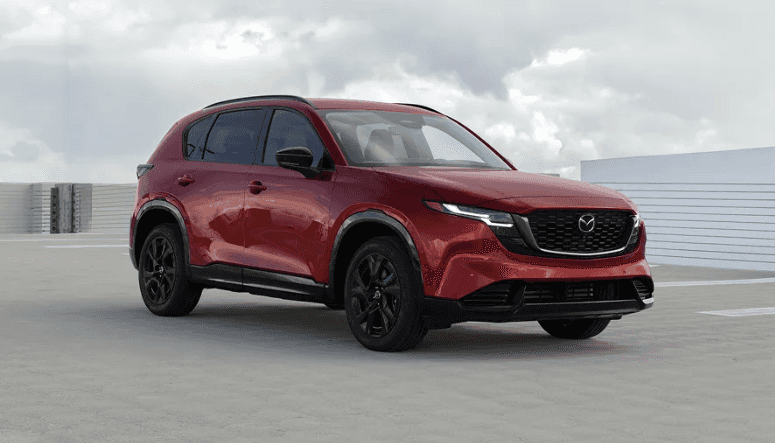
The redesigned 2026 Mazda CX-5 introduces a new approach to in-vehicle technology. Instead of relying entirely on your smartphone for navigation, entertainment, and voice assistance, the latest Mazda Connect infotainment system brings familiar Google services directly into the vehicle.
With Google built-in, drivers can access Google Maps, use Google Assistant for hands-free commands, and explore compatible applications through Google Play. The system is designed to make everyday tasks more convenient while giving drivers multiple ways to interact with their vehicle.
At Capistrano Mazda in San Juan Capistrano, CA, we’re helping drivers understand how this technology works and what it means for everyday travel throughout Orange County. Whether you’re commuting to Irvine, navigating unfamiliar neighborhoods, or planning a weekend trip, here’s how to make the most of the 2026 Mazda CX-5 Google built-in system.
What Is Google Built-In on the 2026 Mazda CX-5?
Google built-in is an integrated infotainment technology that brings selected Google apps and services directly into a vehicle’s multimedia system.
Unlike smartphone projection systems that display apps from a connected phone, Google built-in allows supported services to operate through the vehicle’s own interface, provided the required connectivity and account conditions are met.
The 2026 Mazda CX-5 is the first Mazda vehicle to introduce Google built-in as standard equipment in the United States.
The system is part of the latest Mazda Connect platform and includes three main components:
- Google Maps: Built-in navigation with traffic information, destination searches, and personalized locations.
- Google Assistant: Hands-free voice commands for navigation, supported vehicle settings, and entertainment functions.
- Google Play: Access to a selection of compatible in-vehicle applications.
These services are integrated into the CX-5’s touchscreen interface, allowing drivers to access commonly used functions without relying exclusively on smartphone mirroring.
2026 Mazda CX-5 Touchscreen and Infotainment Features
Volkswagen and other manufacturers have introduced increasingly digital interiors, and Mazda’s redesigned CX-5 represents an important step in the brand’s own infotainment development.
The 2026 Mazda CX-5 offers two center touchscreen sizes, depending on trim level.
| Technology Feature | 2026 Mazda CX-5 Availability |
|---|---|
| Google Built-In | Standard across all trims |
| 12.9-Inch Center Touchscreen | Standard on most trims |
| 15.6-Inch Center Touchscreen | Standard on Premium Plus |
| Google Maps Navigation | Included with Google built-in; connectivity required for connected services |
| Google Assistant | Supported voice assistance |
| Google Play | Compatible in-vehicle apps with required account and connectivity |
| Apple CarPlay and Android Auto | Standard compatibility; wireless availability varies by trim |
The touchscreen features a smartphone-inspired layout with familiar tapping, swiping, and pinching gestures. Frequently used controls, including certain climate and audio functions, are positioned for convenient access.
Steering-wheel-mounted controls provide another way to interact with the system without requiring every adjustment to be made on the touchscreen.
For additional details about display sizes and controls, explore our 2026 Mazda CX-5 touchscreen and infotainment overview.
How to Set Up Google Built-In on Your Mazda CX-5
Before using personalized Google services, it’s helpful to complete the initial account and connectivity setup while the vehicle is safely parked.
According to Mazda’s official Google built-in quick start guide, drivers can create a profile and link a Google Account directly through the infotainment display.
Step 1: Confirm Your Internet Connection
Google built-in requires an appropriate data connection for its connected features.
You can use Mazda Connected Services or connect the vehicle to a compatible Wi-Fi hotspot. Mazda includes a complimentary one-year trial of Mazda Connected Services with new eligible vehicles.
To prepare, check that your Mazda Connected Services enrollment is active through the MyMazda app and that the vehicle has a working connection.
Step 2: Create Your Driver Profile
When setting up the system for the first time:
- Start the vehicle while safely parked.
- Select your preferred language.
- Choose “Set Up Profile” on the touchscreen.
- If prompted, complete Mazda Connected Services enrollment by scanning the displayed QR code.
- Enter a name for your driver profile.
- Review the available Google services and select the appropriate preferences.
- Tap “Accept” to continue.
Your driver profile provides a starting point for personalized system settings and connected features.
Step 3: Link Your Google Account
After creating your profile, select “Set up Assistant and apps.”
You can then use your smartphone to scan the displayed QR code or sign in directly through the vehicle’s touchscreen.
Linking your Google Account enables additional personalized features, including access to saved locations in Google Maps and app downloads through Google Play.
If multiple people regularly drive your CX-5, additional driver profiles may be supported depending on the vehicle configuration and system capabilities.
For the complete manufacturer instructions, consult the Mazda Connect with Google Built-In Quick Start Guide.
Using Google Maps in the 2026 Mazda CX-5
Google Maps is one of the most useful features of the new infotainment system, particularly for drivers who frequently travel between San Juan Capistrano, Laguna Niguel, Mission Viejo, Irvine, and other Orange County communities.
Because navigation is integrated into the vehicle, you can access compatible map features through the center display without first connecting your smartphone through Apple CarPlay or Android Auto.
How to Open Google Maps
Mazda provides several ways to open the navigation system.
- Tap the Map icon on the infotainment navigation bar.
- Select the Google Maps navigation widget when displayed.
- Use the steering-wheel voice control button and say “Open Maps.”
- Activate Google Assistant with “Hey Google,” followed by a navigation request.
The interface provides destination search, navigation guidance, and access to supported map settings.
Search for Destinations With Your Voice
Instead of entering an address manually, drivers can ask Google Assistant to locate a destination.
Examples include:
- “Hey Google, navigate to San Juan Capistrano.”
- “Hey Google, find nearby coffee shops.”
- “Hey Google, take me home.”
- “Hey Google, find the nearest gas station.”
Supported voice commands can be especially convenient when traveling on unfamiliar roads or looking for a nearby business.
Save Your Favorite Places
When signed into a Google Account, Google Maps can provide access to saved destinations and previous searches.
This can simplify recurring trips, such as navigating to work, school, family members’ homes, or frequently visited shopping areas.
Google Maps also provides traffic and place information when the necessary connected services are available. As with any navigation system, traffic conditions and estimated arrival times may change.
How to Use Google Assistant Voice Commands
The 2026 Mazda CX-5 allows drivers to perform many supported tasks using voice commands through Google Assistant.
Voice interaction can reduce the need to navigate multiple touchscreen menus while driving, although drivers must still remain attentive and use the system responsibly.
Three Ways to Activate Google Assistant
Mazda identifies three primary activation methods:
- Say “Hey Google” when voice activation is enabled.
- Press and release the voice control button on the left side of the steering wheel.
- Tap the Google Assistant microphone icon on the touchscreen navigation bar.
Useful Voice Commands for Everyday Driving
Google Assistant supports a range of navigation, audio, and compatible vehicle-control commands.
| Function | Example Voice Command |
|---|---|
| Navigation | “Take me home.” |
| Nearby Locations | “Go to the nearest gas station.” |
| Navigation Audio | “Mute guidance.” |
| Climate Control | “Turn auto climate control on.” |
| Temperature | “Set the temperature to 72 degrees.” |
| Audio | “Turn down the volume.” |
| Radio | “Tune to 101.1 FM.” |
Some voice-controlled vehicle functions depend on installed equipment. For example, commands involving heated or ventilated seats require the relevant seating features to be present.
Google Assistant should be used as a convenience feature, not as a substitute for careful driving or visual confirmation of important vehicle settings.
Downloading Apps Through Google Play
Google built-in also provides access to Google Play, allowing drivers to download certain applications designed for use within compatible vehicle infotainment systems.
This differs from downloading apps onto a smartphone. Only applications supported by the in-vehicle version of Google Play will be available.
How to Access Google Play
Mazda’s official quick start guide outlines a straightforward process:
- Park your vehicle safely.
- Tap the Apps icon on the infotainment navigation bar.
- Select the Google Play icon.
- Browse the available compatible applications.
- Select an application and tap “Install.”
A Google Account and an appropriate internet connection may be required.
What Types of Apps Are Available?
Google Play for compatible vehicles can provide access to selected audio, entertainment, and other applications designed for automotive use.
However, app selection depends on factors such as region, software compatibility, licensing, and service availability.
Not every application available on an Android smartphone can be installed on a vehicle’s infotainment system. Certain features may also be restricted while driving.
Google Built-In vs. Apple CarPlay and Android Auto
One common question is whether Google built-in replaces Apple CarPlay or Android Auto.
It does not. The 2026 Mazda CX-5 supports Apple CarPlay and Android Auto compatibility in addition to Google built-in, giving drivers different ways to access navigation, music, and compatible applications.
Google Built-In
Google built-in runs supported Google services directly through Mazda Connect. It can provide navigation, voice assistance, and compatible applications without requiring smartphone projection.
However, connected functionality still requires an appropriate internet connection, which may involve Mazda Connected Services or a compatible Wi-Fi hotspot.
Apple CarPlay and Android Auto
Apple CarPlay and Android Auto connect a compatible smartphone to the vehicle and display supported phone applications through the infotainment system.
This may appeal to drivers who prefer familiar smartphone applications, existing playlists, saved contacts, or their phone’s navigation preferences.
The 2026 CX-5 includes wired smartphone connectivity on the base 2.5 S trim, while wireless Apple CarPlay and Android Auto connectivity are available on higher trims.
To set up a compatible smartphone connection, Mazda recommends beginning with a USB connection and following the permission prompts on the vehicle display and phone. Wireless activation may then be available on supported configurations.
Does Google Built-In Require a Subscription?
Google built-in is standard equipment on the 2026 Mazda CX-5, but connected services and the data required to operate certain features are separate considerations.
Mazda provides a complimentary one-year trial of Mazda Connected Services, which includes connectivity for Google built-in.
After the trial period, continued Mazda Connected Services access may require a paid subscription. Drivers may also be able to provide connectivity through a compatible Wi-Fi hotspot.
Before purchasing, ask about:
- The beginning and expiration dates of the complimentary trial
- Which connected services are included
- Available subscription options after the trial
- Whether your preferred features require a Google Account
- Whether a personal Wi-Fi hotspot can provide the needed connectivity
Subscription terms, available services, and data requirements may change. Review Mazda’s current connected-services terms for the specific vehicle.
What About Google Gemini in the 2026 Mazda CX-5?
Mazda has announced plans to introduce Google Gemini AI assistant capabilities for vehicles equipped with Google built-in.
Gemini is intended to provide more conversational interactions, allowing users to make requests and ask follow-up questions using natural language.
However, Mazda’s current 2026 CX-5 consumer guidance identifies Google Assistant as the supported voice-assistance system and describes Gemini as a future update.
Drivers should not assume Gemini is active on every 2026 CX-5. Availability may depend on software updates, connected services, and Google’s rollout schedule.
For the most accurate information, confirm the software and voice-assistant features installed on the specific CX-5 you are considering.
Tips for Getting the Most From Your Mazda CX-5 Infotainment System
Once your vehicle is configured, a few simple habits can make the system easier to use.
Complete the Initial Setup Before Driving
Create your driver profile, link your preferred accounts, and review settings while safely parked. This allows you to become familiar with the interface without the pressure of navigating traffic.
Practice Common Voice Commands
Try frequently used commands such as finding a destination, changing the audio volume, or adjusting supported climate settings before a longer trip.
Explore Steering Wheel Controls
The 2026 CX-5 provides steering-wheel-mounted controls that help drivers interact with commonly used functions. Learning their locations can reduce the need to search through touchscreen menus.
Review App and Connectivity Settings
If an application is not working as expected, check whether the vehicle has an internet connection, the correct Google Account is active, and the selected app is supported.
For smartphone projection issues, verify the phone connection and the applicable Bluetooth, USB, or wireless settings.
Ask for a Technology Demonstration
Before leaving the dealership, consider asking for a demonstration of Google Maps, voice commands, driver profiles, and smartphone integration.
Seeing the system in action can make it easier to decide whether the technology matches your preferences.
Frequently Asked Questions About 2026 Mazda CX-5 Google Built-In
Does the 2026 Mazda CX-5 come with Google built-in?
Yes. Google built-in is standard on the 2026 Mazda CX-5. It integrates Google Maps, Google Assistant, and access to compatible Google Play apps into the Mazda Connect infotainment system. Connected features require an appropriate data connection.
Can I use Google Maps without connecting my phone to the Mazda CX-5?
Yes. Google Maps is integrated into the 2026 Mazda CX-5 infotainment system, so smartphone projection is not required. Connected navigation features still require an appropriate data connection through Mazda Connected Services or a compatible Wi-Fi hotspot.
Does the 2026 Mazda CX-5 support Apple CarPlay and Android Auto?
Yes. The 2026 Mazda CX-5 supports Apple CarPlay and Android Auto. The base 2.5 S includes wired connectivity, while wireless connectivity is available on higher trims. Google built-in works alongside these smartphone integration options.
Is Google built-in free on the 2026 Mazda CX-5?
Google built-in is standard equipment, and Mazda includes a complimentary one-year Mazda Connected Services trial that provides connectivity for supported features. Continued connected-services access after the trial may require a paid subscription, or drivers may use a compatible Wi-Fi hotspot.
Does the 2026 Mazda CX-5 have Google Gemini?
Mazda has announced Google Gemini as a future enhancement for vehicles with Google built-in. Current 2026 CX-5 consumer guidance identifies Google Assistant as the supported voice assistant. Drivers should confirm the software version and current Gemini availability for their specific vehicle.
Explore the 2026 Mazda CX-5 at Capistrano Mazda
The 2026 Mazda CX-5 combines a redesigned interior with technology intended to make everyday driving more convenient. From built-in Google Maps navigation to hands-free assistance and compatible applications, the latest Mazda Connect system offers several ways to stay connected.
At Capistrano Mazda, our team can help you compare trim levels, explore the available touchscreen configurations, and see how Google built-in works during a vehicle demonstration.
Explore the 2026 Mazda CX-5, browse our new Mazda inventory, or contact Capistrano Mazda to schedule a test drive.
Capistrano Mazda
32852 Valle Rd
San Juan Capistrano, CA 92675
Sales: 949-218-2445
0 comment(s) so far on 2026 Mazda CX-5 Google Built-In: Navigation, Apps and Voice Controls Explained