



Mazda i-Activsense Safety Features Explained: What They Do and Which Features Vary by Model
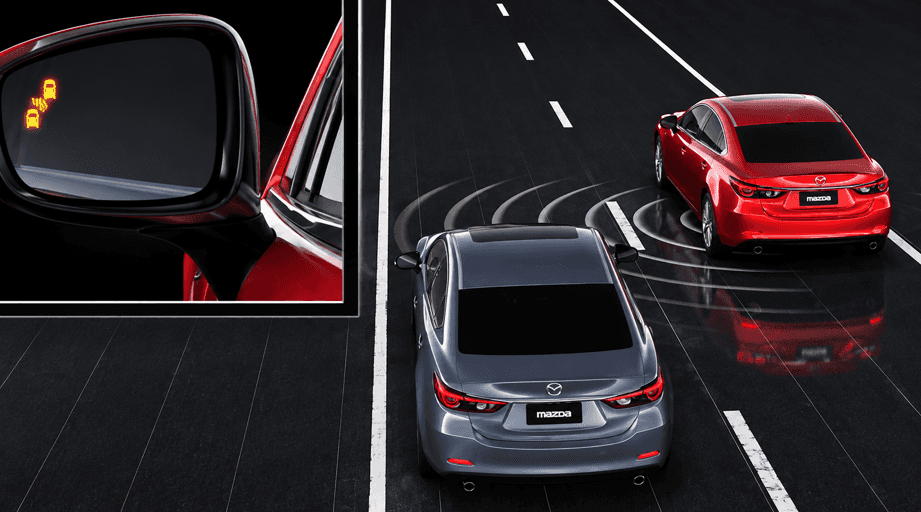
Mazda i-Activsense is the company’s collective name for its advanced safety and driver-support systems, which fall into two groups: active-safety technologies and pre-crash-safety technologies. If you’re shopping for new Mazda vehicles near San Juan Capistrano, you’ll see the name on nearly every model page. This guide covers what each name means for the car on the lot.
What Is Mazda i-Activsense? An Overview of Mazda’s Driver Assistance Technology
Put simply, i-Activsense is an umbrella term covering many separate features. Active safety includes driver-awareness systems that recognize roads and signs, and that can pick up on driver fatigue. It also includes support systems that assist with acceleration, deceleration, and steering.
Two kinds of systems are worth separating. Warning systems notify you of a problem. Others can step in with braking or steering help, but only under specific conditions. Together they make up Mazda’s driver assistance technology, and they work alongside attentive driving and seat belts, plus stability systems. None of it makes a Mazda self-driving.
How Cameras, Radar, and Sensors Work Together
Different features rely on different hardware. The Forward Sensing Camera determines conditions ahead and detects white or yellow lane markings. Mazda’s manuals list it as an input for High Beam Control, Lane Departure Warning, Traffic Sign Recognition, Distance & Speed Alert, Driver Attention Alert, Mazda Radar Cruise Control, Lane-keep Assist, and forward Smart Brake Support, among others.
Radar covers other jobs. The 2026 CX-50 has a front radar sensor, front-side radar on some models, and rear-side radar sensors. Some 2026 CX-50 models also have ultrasonic sensors for parking assistance. Not every feature uses every sensor, and Mazdas don’t all combine inputs the same way.
Mazda i-Activsense Safety Features by Function
Below is each major system in plain terms, with what it does, what you’ll notice on the road, and where availability varies.
Collision Avoidance: Smart Brake Support and Forward Warnings
Smart Brake Support (SBS) is Mazda’s collision-avoidance system. SBS Forward can alert you to objects in your forward path and activate automatic emergency braking if a potential collision is predicted. SBS Reverse alerts you to objects or pedestrians behind the vehicle and can activate automatic emergency braking.
On the 2026 CX-50, forward detection triggers a screen display and a warning sound. Brake control is applied if the risk increases. Rearward SBS operates between 2 mph and 9.3 mph, and Rear Crossing detection works at about 9.3 mph or slower.
Treat the warning as a request for you to act. Braking is a separate capability with its own operating requirements. Smart Brake Support terminology can also differ across model years, so confirm which functions a given vehicle has.
Blind Spot Monitoring and Rear Cross Traffic Alert
Blind Spot Monitoring (BSM) detects vehicles in your blind spots and gives visual alerts. If you signal a lane change while a vehicle is there, an audible alert can activate too. On the I-5 or Pacific Coast Highway, that second cue is a handy reminder, though mirrors and shoulder checks still matter.
Rear Cross Traffic Alert (RCTA) helps when you back out of a parking space. It gives audible and visual warnings when a vehicle approaches from either side. Mazda cautions that the Blind Spot Monitoring warning light may not flash, or may be delayed, even when a vehicle is behind you. Checking the rear area stays your job.
Vehicle Exit Warning is a related feature on the 2026 CX-5. It warns occupants about vehicles or bicycles approaching from the rear when the vehicle is stopped.
Lane Departure Warning, Lane-keep Assist, and Mazda Radar Cruise Control
Lane Departure Warning sounds and displays an alert when you may be leaving your lane without signaling. Lane-keep Assist can provide momentary steering assistance, but it won’t drive hands-free or center the car in the lane continuously. On the 2026 CX-5, Road Keep Assist adds alerts plus momentary steering help if the vehicle begins to leave the road.
Mazda Radar Cruise Control (MRCC) maintains a set speed or following distance. It can also stop and go with traffic without you using the brake or accelerator pedals, which is a real help in stop-and-go traffic around San Juan Capistrano.
On the 2026 CX-50, MRCC operates from about 0 to 90 mph. It offers four following-distance settings:
- Long
- Medium
- Short
- Extremely short
If the vehicle ahead stops, the CX-50 also stops. You can change MRCC settings through the Settings menu on the Mazda Connect home screen. Stop-and-go capability varies, so ask about it for any specific vehicle.
Visibility and Driver Support: Lighting, Camera Views, and Driver Attention Alert
Several features help you see and stay alert:
- Adaptive Front-Lighting System pivots the headlights in the direction the steering wheel is turned.
- High Beam Control maintains high beams and switches to low beams when it detects an oncoming or preceding vehicle.
- Traffic Sign Recognition uses the forward camera and shows sign information on the Active Driving Display. Keep watching real road signs, since the display can be incomplete.
- 360° View Monitor uses exterior cameras to show a view on the Mazda Connect screen for parking and tight spaces.
- Parking sensors identify nearby obstructions and give screen displays and warning sounds as you approach.
Driver Attention Alert encourages a rest with audible and visual alerts when your steering pattern or lane position suggests fatigue or inattentiveness. On the 2026 CX-50, it assesses driving between about 41 mph and 86 mph over about 20 minutes. It only reminds you and can’t replace rest. If you’re tired, pull over safely instead of waiting for an alert.
Which Mazda i-Activsense Features Vary by Model, Trim, and Package?
Features and availability vary by model year, trim, and package. Confirm details with our team or the Owner’s Manual. A model name alone doesn’t identify every system, because trim columns differ. Two vehicles can also list similar system names while differing in capability.
This section covers the 2026 CX-5 only, since other models differ. Every 2026 CX-5 trim comes standard with Smart Brake Support Forward with Turn-Across Traffic, Smart Brake Support Reverse with Rear Crossing and Pedestrian Detection, front and rear parking sensors, Blind Spot Monitoring, Vehicle Exit Warning, Lane Departure Warning and Lane-keep Assist. Also standard are Emergency Lane Keeping (with Blind Spot Assist, Road Keep Assist and Head-on Traffic Avoidance Assist), Mazda Radar Cruise Control with Stop & Go and Speed Limit Assist, Distance & Speed Alert, Traffic Sign Recognition and Driver Attention Alert. Rear Cross Traffic Braking and Forward Turn-Across Traffic Braking are new standard features on this generation, which shows that two Mazdas with “Smart Brake Support” can still differ in what it covers.
Beyond those, these additional features by trim:
- 2.5 S and 2.5 S Select: None marked.
- 2.5 S Preferred and 2.5 S Premium: Active Driving Display.
- 2.5 S Premium Plus: Active Driving Display, Cruising & Traffic Support, Adaptive Front-Lighting System, 360º View Monitor, Front Cross Traffic Alert and Braking, and Driver Monitoring.
For the 2026 CX-30, Smart Brake Support, Blind Spot Monitoring, and Lane-keep Assist are standard on all models. The model page links a “Compare Trims & Specs” comparison, and its FAQ says trims differ in safety features.
Shopping used vehicles or certified pre-owned models? Older model years may have different feature sets, so verify each one individually. Consider this general product information only; it isn’t legal or insurance advice.
Limitations: Weather, Sensor Conditions, and Why Attentive Driving Still Matters
Are Mazdas safe? Mazda’s i-Activsense is a useful driver aid, but attentive driving still comes first. You remain responsible, and every system has limits in range, detection, and operation. Availability varies by model year, trim, and package, so don’t assume a system you’ve read about is on your vehicle.
Coastal fog and low-sun glare near San Juan Capistrano can limit what the sensors see. Camera-based features can struggle with rain, fog, snow, glare, dirty sensors, faded lane markings, and sharp curves. Examples from Mazda’s manuals include:
- The 2026 CX-50 forward camera may not judge vehicles or obstructions accurately in rain, fog, or snow, or when spray from a vehicle ahead reduces visibility.
- Camera functions can stop temporarily because of fog, direct sunlight, high temperature, or a dirty or fogged windshield.
- Targets that are extremely close or far, suddenly enter the path, or are hard to see in dark, strong, or changing light may not be detected correctly.
- On the 2026 Mazda3, glare from driving toward the sun can keep the Forward Sensing Camera from operating normally.
- The 2026 CX-50 front radar may have difficulty detecting a vehicle with limited radio-reflecting areas. Continuous tall concrete walls may prompt temporary dirty-sensor messages.
Even when the status symbol is green, systems that don’t meet their operating conditions won’t operate. A missing warning doesn’t prove the lane or reversing path is clear.
How to Adjust Mazda Driver Assistance Settings and Care for Sensors
These details come from the 2026 CX-50. Other models and years may differ, so check your Owner’s Manual. On the CX-50, the i-ACTIVSENSE OFF switch temporarily stops the systems assigned to it. Press it again to restore them. Systems turned off this way come back on the next time vehicle power is switched on.
The status symbol tells you where things stand: white is standby, green is operating, and amber is malfunction. A separate OFF symbol shows when systems are cancelled with the switch. Adjust menus while parked, and learn these indicators before you rely on a feature.
Sensor care is simple:
- Keep the glass around the forward camera clear of dirt and fogging.
- Avoid stickers, film, or accessories near the camera, and don’t touch or scratch the lens.
- Remove foreign matter near radar sensors, and don’t use high-pressure water or strong rubbing.
- Don’t cover sensors with parts or stickers.
- Keep the rear bumper clean and avoid heavy tint that obstructs sensors.
Have calibration checked after windshield or bumper repair or collision work. Our service department can answer sensor cleaning questions and calibration checks.
How to Check Which i-Activsense Features a Specific Mazda Has
The reliable way to confirm Mazda safety features is to check the exact vehicle. Official model pages distinguish standard from available equipment. The Owner’s Manual gives vehicle-specific operation and cautions. This matters for anyone comparing safety features on a Mazda CX-5 across trims.
Reading the Window Sticker, Trim Specs, and Owner’s Manual
Start with the exact model year and trim. Then compare the vehicle’s listed equipment against Mazda’s trim specifications and the Owner’s Manual for that model year. A current model page shouldn’t be used to establish an older vehicle’s equipment. Our team can confirm what’s installed and show you the controls and indicators.
Questions to Ask Before You Buy or Test Drive
Take these questions with you:
- Is Radar Cruise Control with stop-and-go included on this trim?
- Which Smart Brake Support functions does this vehicle have: forward, reverse, rear crossing?
- Which controls adjust or turn off the assistance systems, and what limits does this model year’s Owner’s Manual list?
- Has the windshield or bumper been replaced or repaired?
On a test drive, judge how clear the alerts are and how natural the controls feel. Don’t try to trigger emergency braking.
Compare Current Mazda Models and Inventory at Capistrano Mazda
Compare the Mazda models in our inventory, including the Mazda3, CX-30, CX-5, CX-50, CX-50 Hybrid, CX-70, CX-90 and MX-5 Miata, by model year, trim and installed equipment. A higher trim doesn’t automatically have every system you want.
Browse, Ask, and Plan Your Visit
Ready to see them in person? Browse our inventory, then contact us to confirm a vehicle’s features and arrange a guided demonstration of its controls and displays. If you’re planning the purchase, you can also start the financing application ahead of your visit. Whether your drives are daily I-5 commutes or weekend trips along the coast, we’ll help you match the technology to your driving.
0 comment(s) so far on Mazda i-Activsense Safety Features Explained: What They Do and Which Features Vary by Model